Stop Chasing Design Tools. Start Building a Design Harness
How design teams can turn scattered AI use into a practice that evolves through tool releases, model updates, and org changes.


Key Takeaways
AI keeps lowering the floor for design output. Average work is becoming easier to produce, and easier to recognize.
Design teams need a workflow that lifts generated work toward their full potential, and thrives in the tool churn.
A design harness gives teams a practical layer they can own: persistent context, reusable skills, orchestrated workflows, clear evaluation, and compounding knowledge.
TL;DR
A mental model gaining traction in agent design is:
The model provides the core capability. The harness makes that capability usable in practice.
For design teams, that idea translates like this:
Design Harness = Context + Skills + Orchestration + Evaluations + Compounding
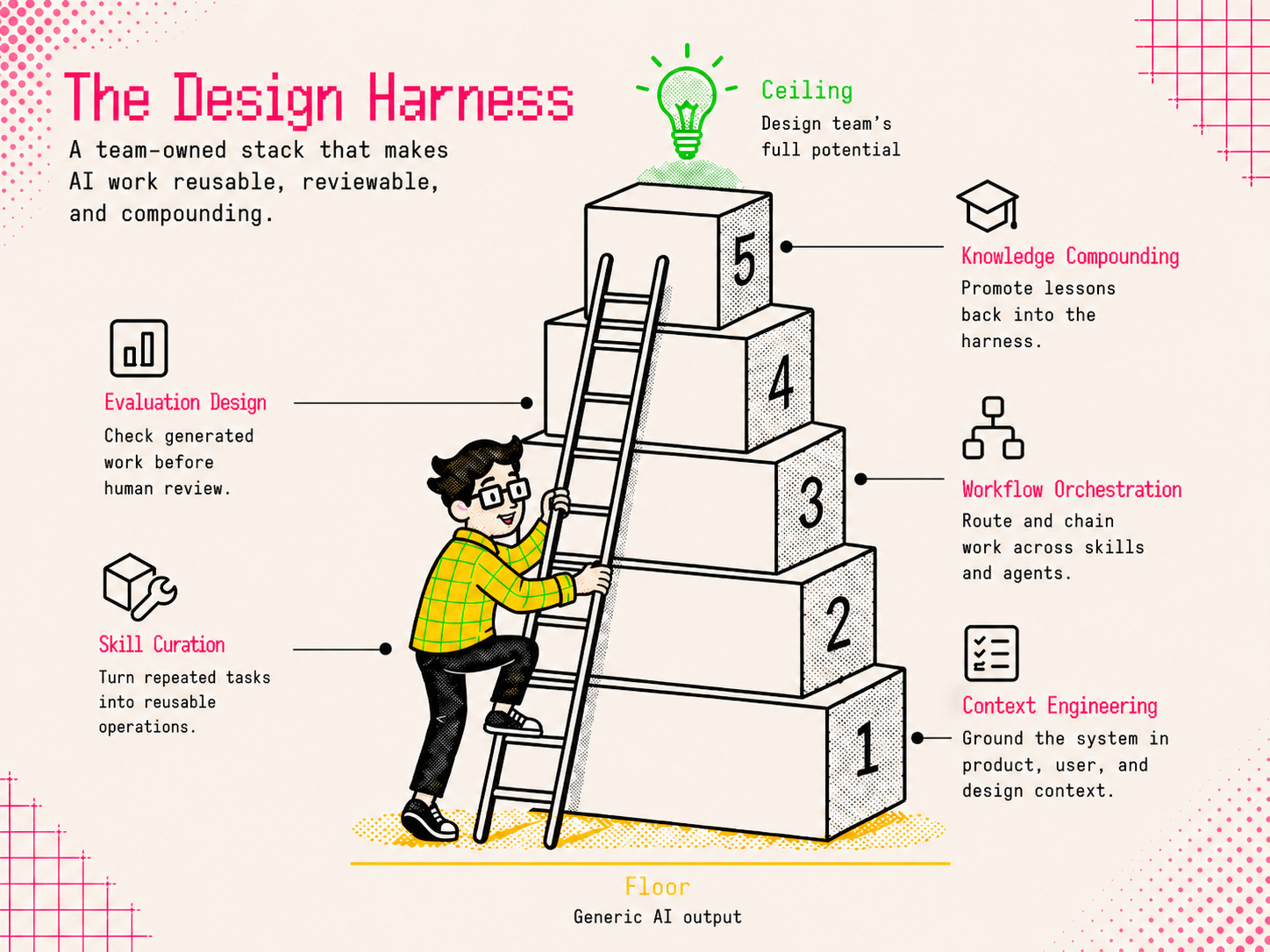
Build those layers in a repo you own, and AI stops behaving like a pile of isolated sessions. Context carries forward, skills become reusable, experimentation gets safer, and team learning survives tool changes.
For a concrete place to begin, harness-designing-plugin gives you a set of tools to get started.
Like a rolling stone
Every design team I know is trying to answer the same question:
How should AI actually fit into the design process?
The first instinct is to follow the tools.
Paper shows up as a Figma alternative. Then Stitch pushes the conversation toward vibe designing and engineering design.md documents. Soon after, Claude Design reframes the pitch around grounding generation more directly in a team’s design system. Then OpenAI’s latest image release stretches it further into brand kits and visual systems.
Each release points in the same direction: the floor keeps lowering. Average, templated design work is getting easier to produce, and easier to recognize. That helps people starting from scratch, exploring new ideas, or moving quickly on their own. But teams with existing products, assets, systems, and higher standards need more than another way to generate average work. They need a way to make generated work climb toward their specific standards, taste, and ceiling.
And that’s exactly where the friction starts.
Why this starts to feel Sisyphean
Every new tool comes with the same cost: rebuilding the working conditions around it before it becomes useful.
That pattern usually shows up in four places.
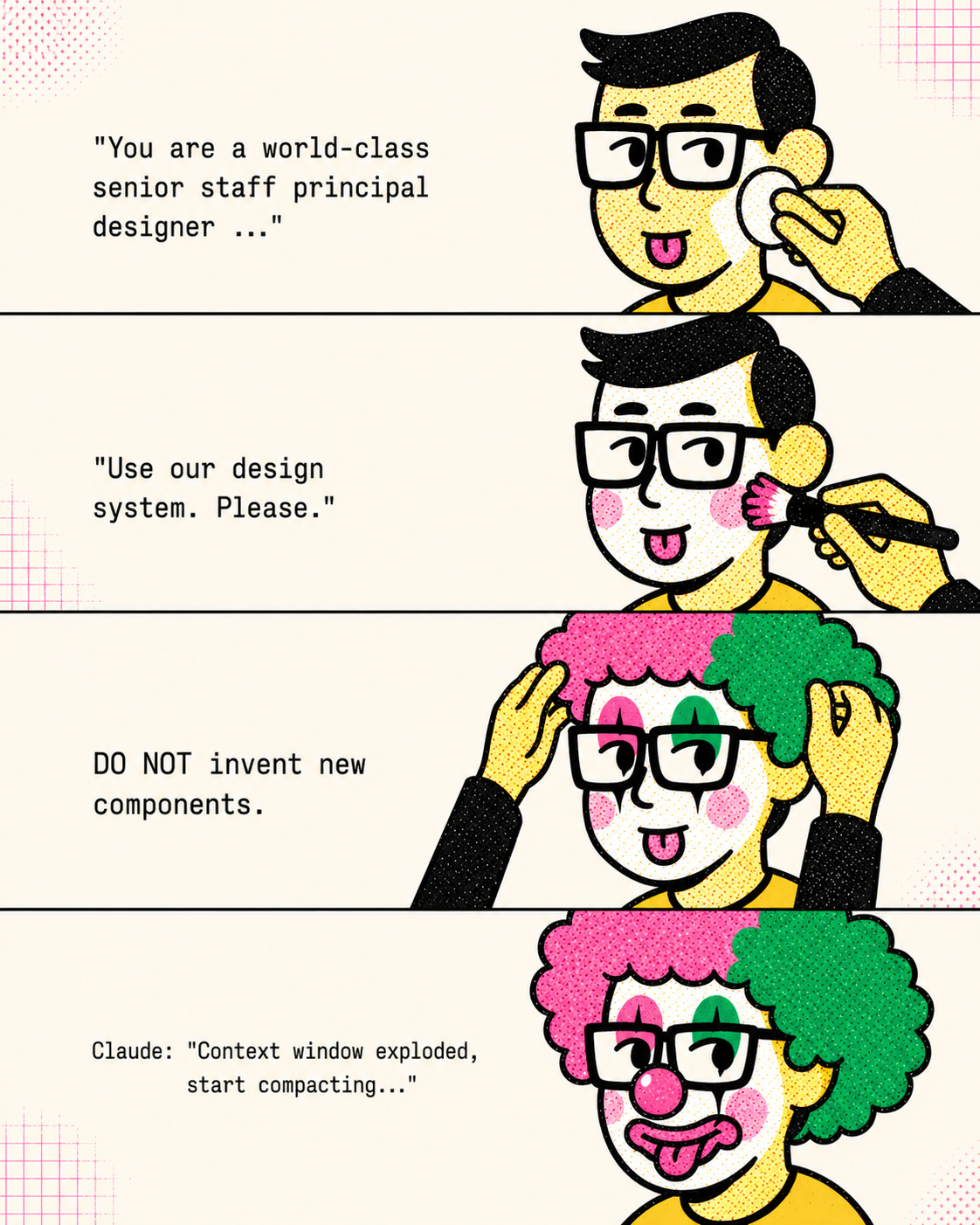
The setup tax. We all know the ritual. We open a new chat and spend ten minutes massaging the AI: “You are a world-class senior staff designer.” “Here’s the product.” “Use our design system.” “Do not invent new components.” All of that. Every time.
The context collapse. Just when the conversation feels grounded, the thread bloats, the model loses the plot, and we find ourselves begging the AI to summarize. Then we paste that half-trusted slop into a new chat, cross our fingers, and pretend we can pick up where we left off.
The solution silo. One designer figures out how to get the model to respect the component system. Another lands on the critique framing that finally produces useful feedback. Someone else finds the workaround for a recurring edge case. But those discoveries rarely become shared infrastructure. They stay trapped in threads, personal notes, and individual habits. The team gets smarter person by person, but not system by system.
The review debt. Once everyone gets hyper-productive, the bottleneck shifts. We have plenty of output. What’s missing is constructive review. By the time work reaches a teammate, we may already be burned out from the micro-review loops that happen while prompting, correcting, and regenerating with AI. Cheap generation can create expensive critique.
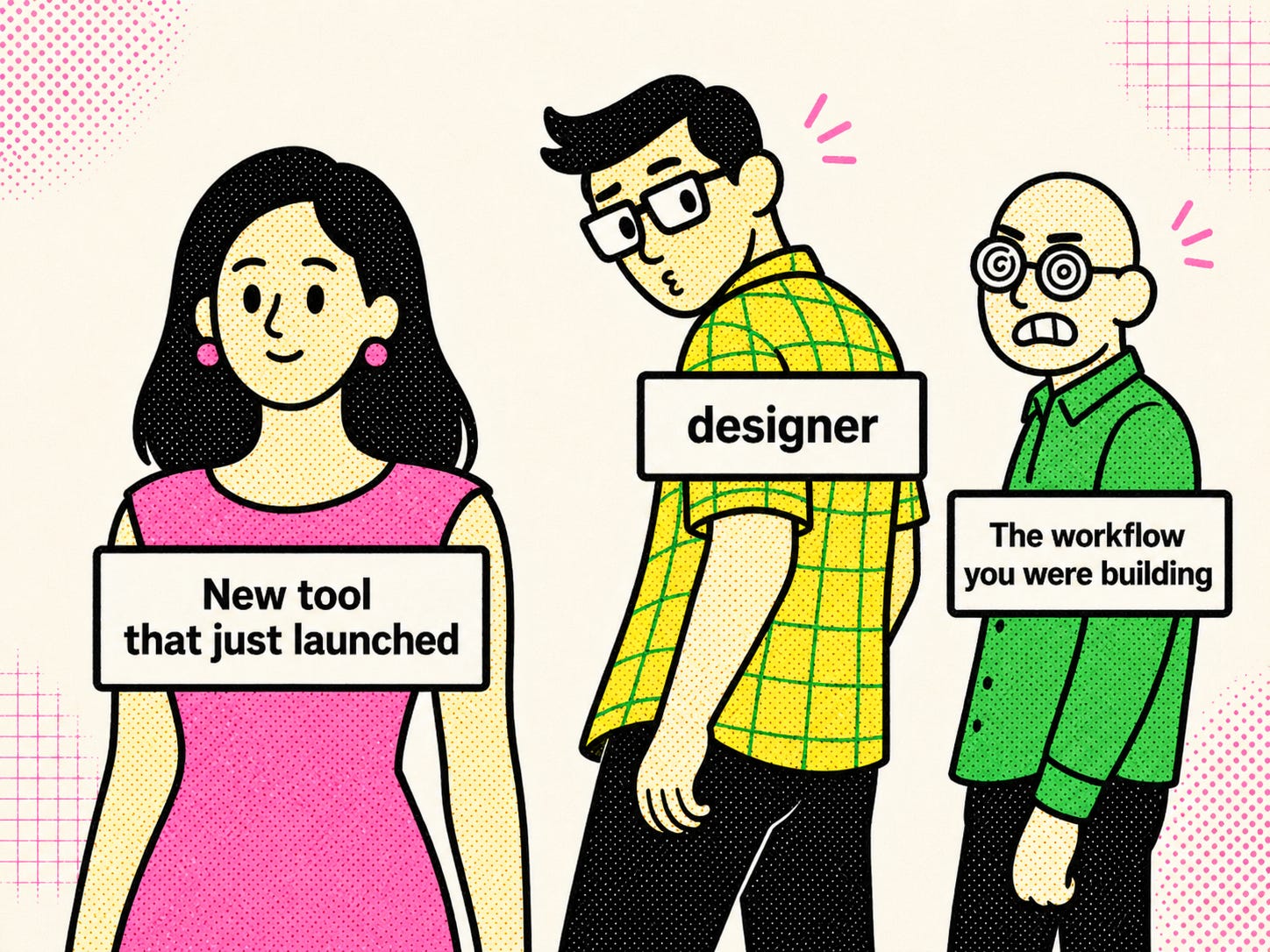
With each tool release, the loop repeats. The team gets curious, sensing and fearing there’s a better option out there. The workflow you were building suddenly feels unfinished. A few designers break off to try the new thing. Parts of it work, which makes it harder to ignore. Before the team can settle, another tool shows up.
That’s the trap. When each tool resets the practice, the team never builds leverage. It just gets better at onboarding the next tool.
How might we harness the tools instead of chasing them?
The answer is a layer the team owns: a design harness. It stores the context, skills, workflows, standards, and lessons that make AI useful beyond a single session.
In practice, it can start as a GitHub repo that both teammates and agents can access.
<repo-root>/
├── AGENTS.md           # always-loaded entry point for the harness
├── docs/
│   ├── context/        # Layer 1
│   ├── rubrics/        # Layer 4
│   └── knowledge/      # Layer 5
├── skills/             # Layer 2
└── agents/             # Layer 3
AGENTS.md is the always-loaded entry point. It defines the agent’s role and what it can do: which context to load, which skills it can call, when to hand off, where evaluation and knowledge live.
docs/context/ holds durable context. skills/ holds repeatable jobs. agents/ holds workflow orchestration. docs/rubrics/ holds evaluation logic. docs/knowledge/ holds what the team learns over time.
A harness doesn’t have to be complete to be useful. Even a basic version changes what gets produced:
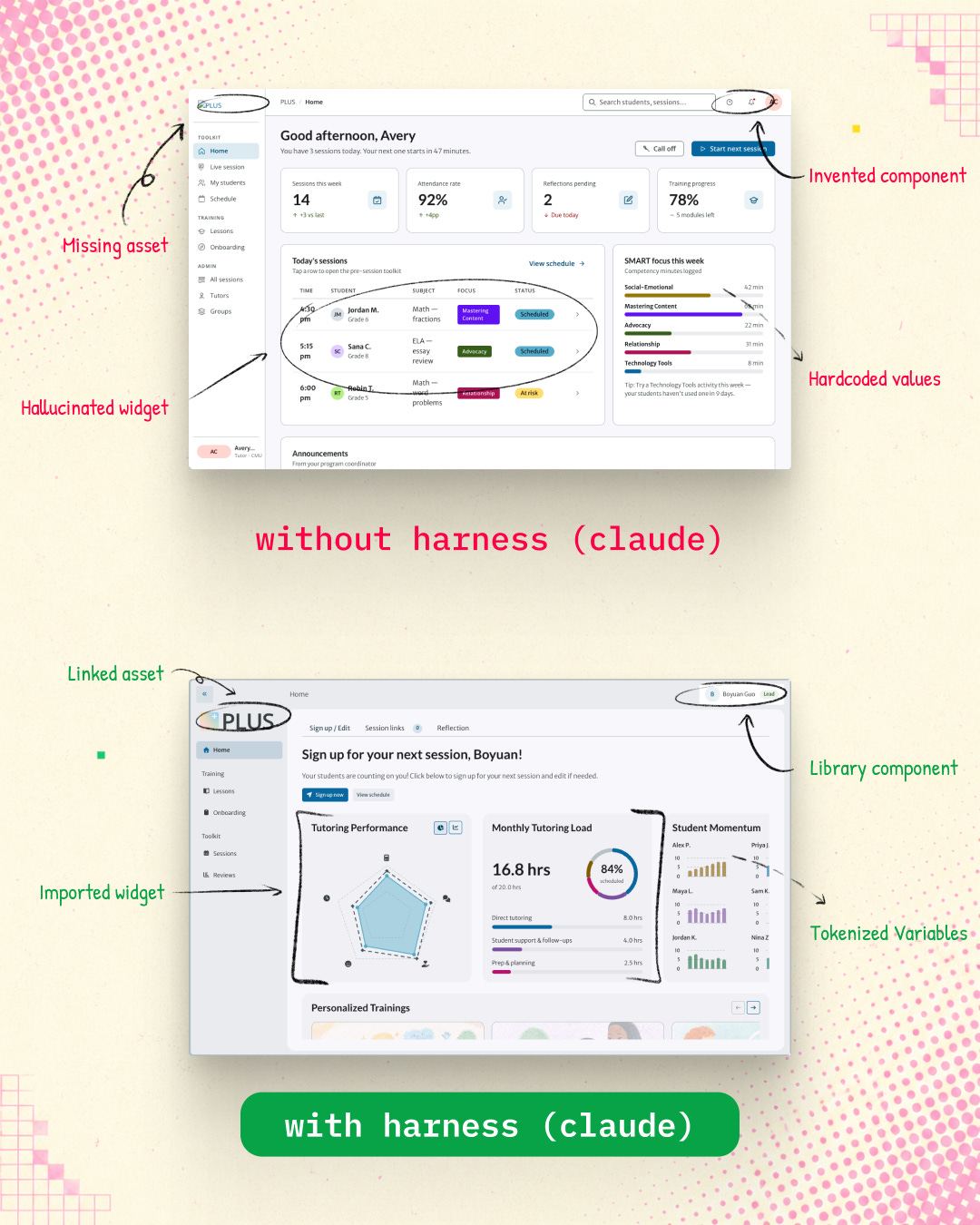
Besides better output, the day-to-day work also starts to shift:
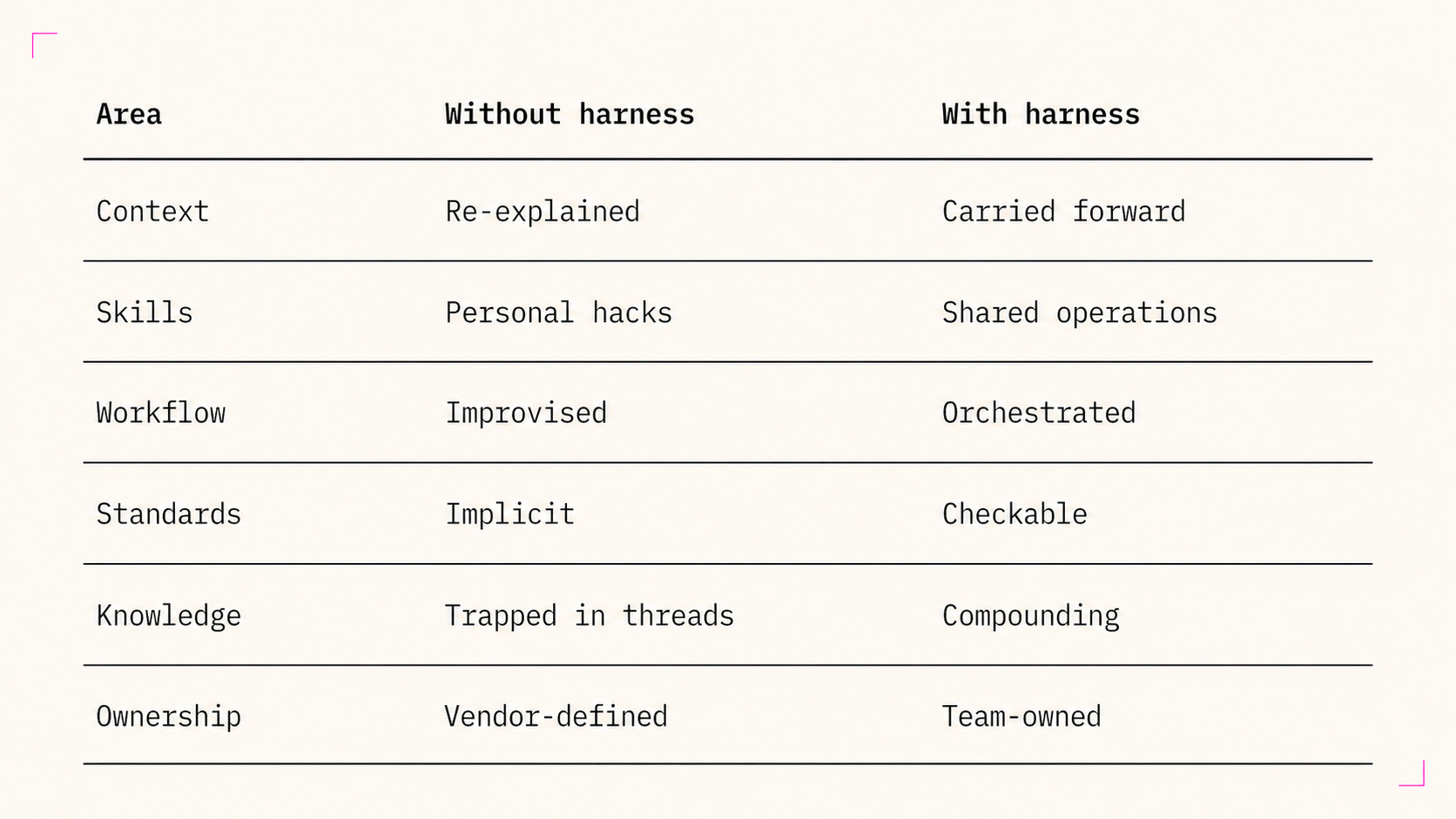
As the harness matures, design teams can incorporate new tools more sustainably: less switching cost, less mental burden, and better outcomes each time.
Layer 1 - Context Engineering
Prompting closes the communication gap. Context closes the information gap.
A better prompt can help the model understand what you want in the moment. It can’t rebuild the team’s information base every time a new session starts. That’s what context engineering is for.
This layer builds on the same idea as design.md. The goal is to give the agent access to the core context the human in the loop trusts.
Design teams already produce a lot of this material: product one-pagers, requirements, user journey maps, service blueprints, success metrics, and design system documentation. Context engineering starts by upcycling what already exists into durable files that can be reused across sessions, teammates, and tools.
That’s where progressive disclosure comes in. The harness should give the agent the right context at the right moment. It should start with the smallest useful slice, then pull in deeper product, system, or research context only when the task calls for it. If you’re tweaking the corner radius of a button component, you probably don’t need the whole service blueprint in context.
Here’s a simple starting shape:
docs/
└── context/                     # L1, what's always true
    ├── product/
    │   ├── one-pager.md
    │   ├── user-research/
    │   ├── user-journeys/
    │   ├── service-blueprints/
    │   ├── capabilities.md
    │   └── success-metrics.md
    ├── engineering/
    ├── design-system/
    │   ├── principles.md
    │   ├── design-language.md
    │   ├── foundations/        # color, elevation, icon, layout, motion, typography
    │   └── components/
    └── conventions/
Teams with mature design systems already have a head start. A lot of what lives in Figma today already counts as reusable context. Principles, foundations, component usage guidance, naming conventions. The more context lives in the harness, the less you re-explain it every session.
Layer 2 - Skill Curation
Context makes your agent better at understanding the work. Skills make it better at doing the work.
If you haven’t heard of a skill before, you can think of it as a pre-packaged, well-crafted prompt, but it goes beyond that in several ways:
It carries trigger logic, so the agent knows when to use it and when to stay out of the way.
It is not flat: context loads dynamically, only when the job calls for it, keeping the context window lean. This is the same progressive disclosure idea from Layer 1, applied to skills.
It is not limited to text. Assets, references, and scripts can travel with it.
Suppose a designer wants help turning a wireframe into a higher-fidelity prototype that still respects the design system. In a normal chat workflow, that method stays personal: a prompt, a checklist, a few dos and don’ts. We can turn this into a prototype/ skill the team can reuse. It’s built from four parts:
skills/
└── prototype/
    ├── SKILL.md
    ├── references/
    │   ├── low-fi/
    │   ├── mid-fi/
    │   └── high-fi/
    ├── assets/
    │   ├── wireframes/
    │   ├── svg/
    │   ├── tokens/
    │   └── copy/
    └── scripts/
        ├── export-assets.ts
        ├── validate-tokens.ts
└── package-output.tsSKILL.mddefines what the skill is for, when to use it, what it expects, what constraints to obey, and what to return. For a prototype skill, that might mean preserving flow structure, using approved components, and packaging output for reuse.references/gives the skill precedent at the right fidelity. Low-fi for information architecture, mid-fi for interaction patterns, high-fi for polish. This helps the model reach for the right kind of solution instead of improvising the wrong visual language.assets/holds the files the skill needs to inspect or produce. Wireframes, SVGs, tokens, copy. The concrete materials that keep the skill grounded.scripts/wraps repeatable automation. Validating tokens, exporting assets, packaging output for handoff so the model isn’t redoing those steps from scratch.
Anyone can call a skill, run the operation, and hit the same quality bar. That’s how repeatable work becomes reliable.
Layer 3 - Workflow Orchestration
Workflow is where skills connect and new tools fit without starting over.
Skills get more powerful when they connect. That’s what workflow makes possible. Most design teams already have a workflow, even when it isn’t written down. The challenge is making it explicit enough for the agent to follow.
Take the Double Diamond, a framework that many design thinkers are familiar with, as an example:
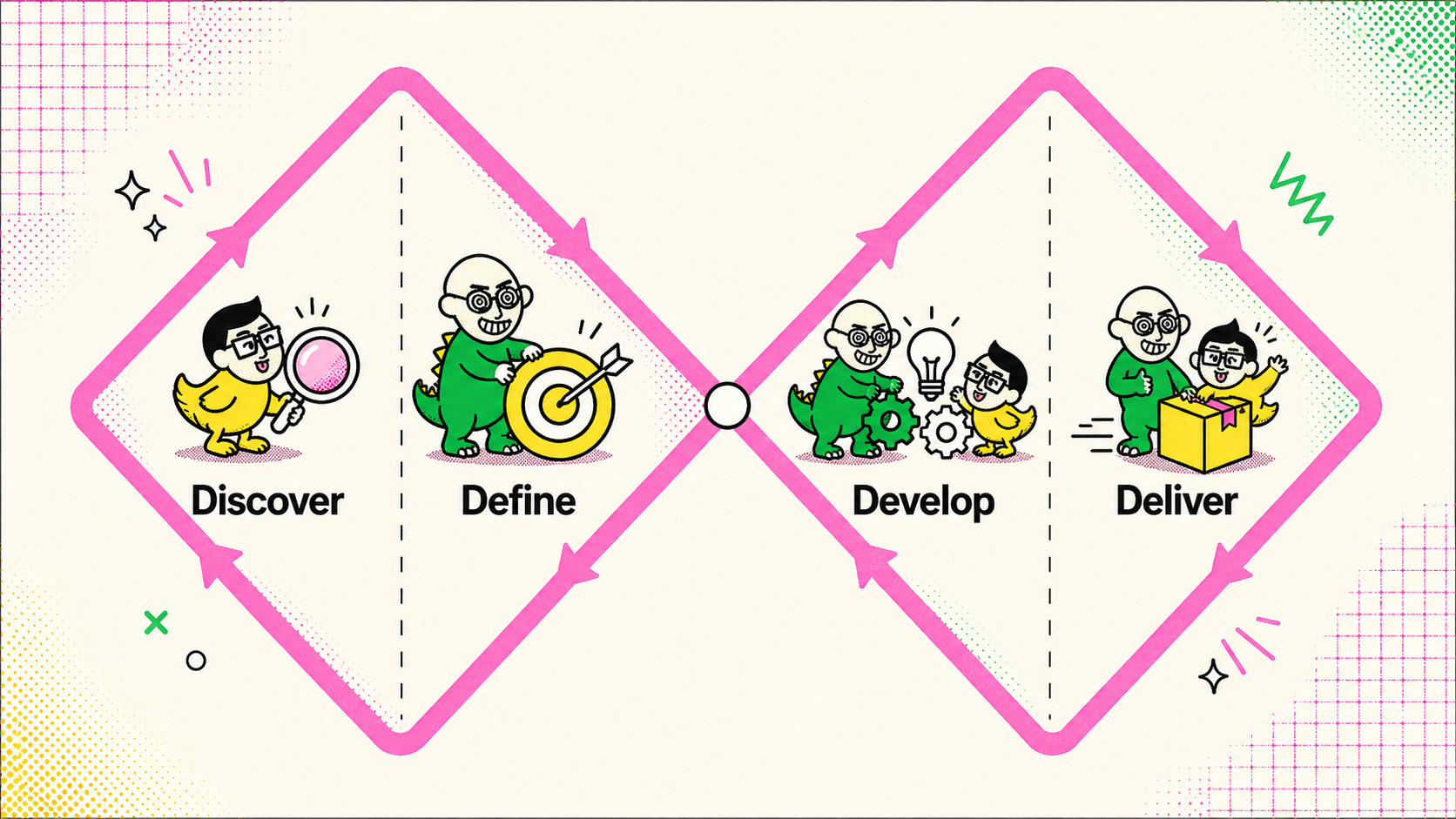
That shape points toward the first skills a team builds:
Discover introduces a research synthesis skill.
Define introduces a problem-framing skill.
Develop introduces concepting, prototyping, and critique skills.
Deliver introduces handoff, QA, and documentation skills.
As those skills mature, the workflow can become more sophisticated. A team might start with four broad skills, then break them into more specialized operations: journey synthesis, opportunity framing, interaction design, accessibility review, and handoff packaging.
With more skills in play, coordinating them becomes the next thing to design. That’s orchestration, and it lives in agents/. Where skills/ define what each operation does, agents/ define how those operations move through the workflow. This layer handles routing and chaining: which agent should handle the request, which skill should run next, which steps need to happen in sequence, and which checks can run in parallel.
An expanded agents/ folder might look like this:
agents/
├── orchestrator.md
├── workflows/
│   ├── double-diamond.md
│   ├── prototyping-sequence.md
│   └── parallel-review-checks.md
├── roles/
│   ├── research-synthesis-agent.md
│   ├── product-framing-agent.md
│   ├── interaction-design-agent.md
│   ├── visual-system-agent.md
│   ├── content-design-agent.md
│   ├── accessibility-review-agent.md
│   └── handoff-agent.md
└── handoffs/
    ├── handoff-template.md
    └── review-gate-template.md
For example, a prototype/ skill might route first to an interaction-design agent, then chain into a visual-system agent and a handoff agent.
sequential prototyping steps
→ interaction-design-agent
→ visual-system-agent
→ handoff-agent

parallel checks:
↳ content-design-agent
↳ accessibility-review-agent
↳ evaluation rubric
The agents generating the prototype work sequentially, iterating on different parts. Once that’s done, the reviewer agents run in parallel to check against all rubrics.
But running the workflow well isn’t enough. Every output still needs a check before it reaches a person.
Layer 4 - Evaluation Design
Standard left undefined becomes output left unaligned.
The model’s non-deterministic behavior is a feature, not a bug. It gives the system room to explore. Without evaluation, that same flexibility turns into drift.
Evaluation design defines what “good enough to review” means before a teammate sees it. If you’re familiar with software development, think of these as test cases for design work. They catch predictable failures before someone has to look at them.
Useful checks are often narrow: component usage, token usage, accessibility, content fit, or system alignment. They don’t need to judge the whole piece of work at once.
In the same prototype example, once the agent produces work for review, an evaluation rubric might focus on component usage and token usage. Not the whole prototype. Just that one class of system alignment.
prototype skill rubric: component and token usage

Criteria
- Uses approved design-system components where applicable
- Avoids recreating existing components from scratch
- Uses approved tokens instead of hard-coded values
- Keeps spacing, radius, color, and type choices aligned to system tokens

Pass signal
- Output stays within the component library and token system
- No obvious system drift or hand-made substitutes appear in the result

Fail signal
- Invents local variants of existing components
- Hard-codes visual values where tokens should have been used
- Mixes system-approved elements with ad hoc styling
Rubrics protect critique from becoming cleanup.
Layer 5 - Knowledge Compounding
Sessions end. Lessons shouldn’t.
This layer is heavily inspired by Kieran Klaassen’s work on Compound Engineering and the idea that each unit of work should make the next one easier.
Designers learn useful things while prompting, prototyping, reviewing, and debugging with AI. In most AI workflows, those lessons disappear into the thread.
Knowledge compounding captures those bits and bytes of insight and helps the harness improve over time.
Some lessons need more of the agent’s attention than others. Memory types are one way to organize this:
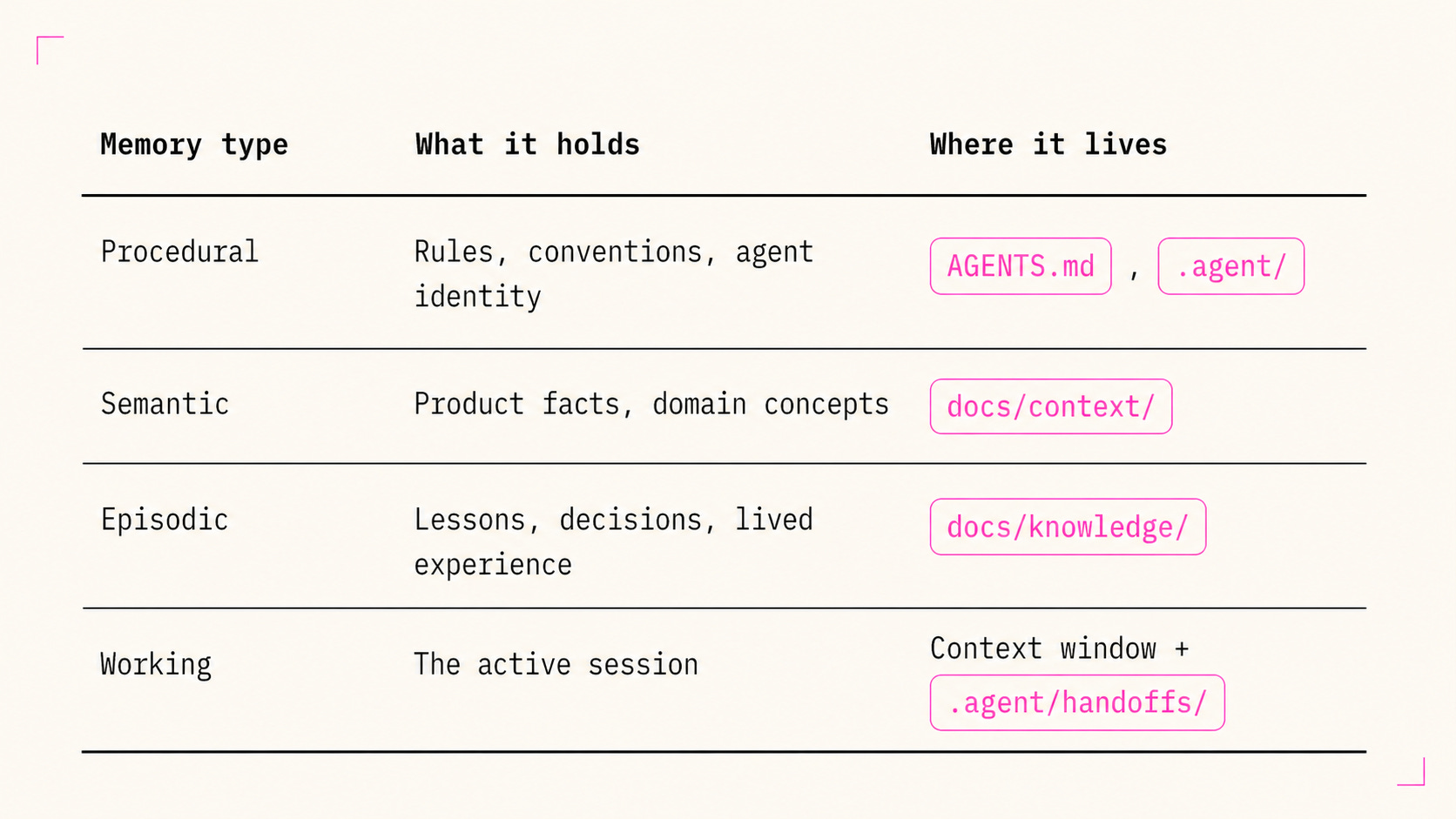
New lessons start in the episodic layer:
docs/knowledge/
├── changelog.md
├── decisions.md
├── ideations.md
├── preferences.md
└── lessons/
    └── YYYY-MM-DD-slug.md
This gives observations somewhere to land before they earn their way up.
Where each lesson lives depends on how often it shows up and how much it matters. This is how knowledge compounds beyond the knowledge folder:
A one-off observation stays in
docs/knowledge/.A repeated pattern moves into
docs/context/.A rule everyone follows belongs in
AGENTS.md.
That upward movement is promotion. Lessons move higher as they prove themselves over more sessions. Retirement moves in the other direction. When a lesson stops helping, it gets obsoleted and removed from the harness.
The floor, the ceiling, and the ladder
Tools lower the floor. Taste sets the ceiling. Your harness is the ladder.
The tools aren’t weak. The releases aren’t all overhyped. But tools come and go. What’s worth your time and energy is the durable asset, the layer your team owns. Build the harness and you’ve built the ladder to your team’s full potential.
To put this into practice, harness-designing-plugin packages these ideas into a practical set of tools to get moving.
For a working example: my team of 15 at PLUS built PLUS-UNO. It’s our own harness, shaped to our product, design system, and team practice.
Build the layer you own. Build your ladder.
References and influences
This piece draws on a few bodies of work that made the design-harness framing more legible:
Harness vocabulary and anatomy: LangChain’s The Anatomy of an Agent Harness and related writing on harness memory. This is the main vocabulary lineage for “harness,” memory framing, and team ownership.
Compounding practice: Compound Engineering by Kieran Klaassen at Every. The lesson → rule loop shaped Layer 5.
Context engineering and long-running agents: Anthropic’s writing on context engineering, harness design for long-running apps, and Claude Skills. These shaped the progressive disclosure and attention-budget framing.
Working examples: Plus Uno and harness-designing-plugin.
 | A guest post by
|
Great read! Welcome to Substack :)